
ViewJSON
Free online JSON viewer that automatically detects and previews Base64-encoded images, audio, video, and PDFs inline. Also supports JSON formatting and file-to-Base64 conversion.
About ViewJSON
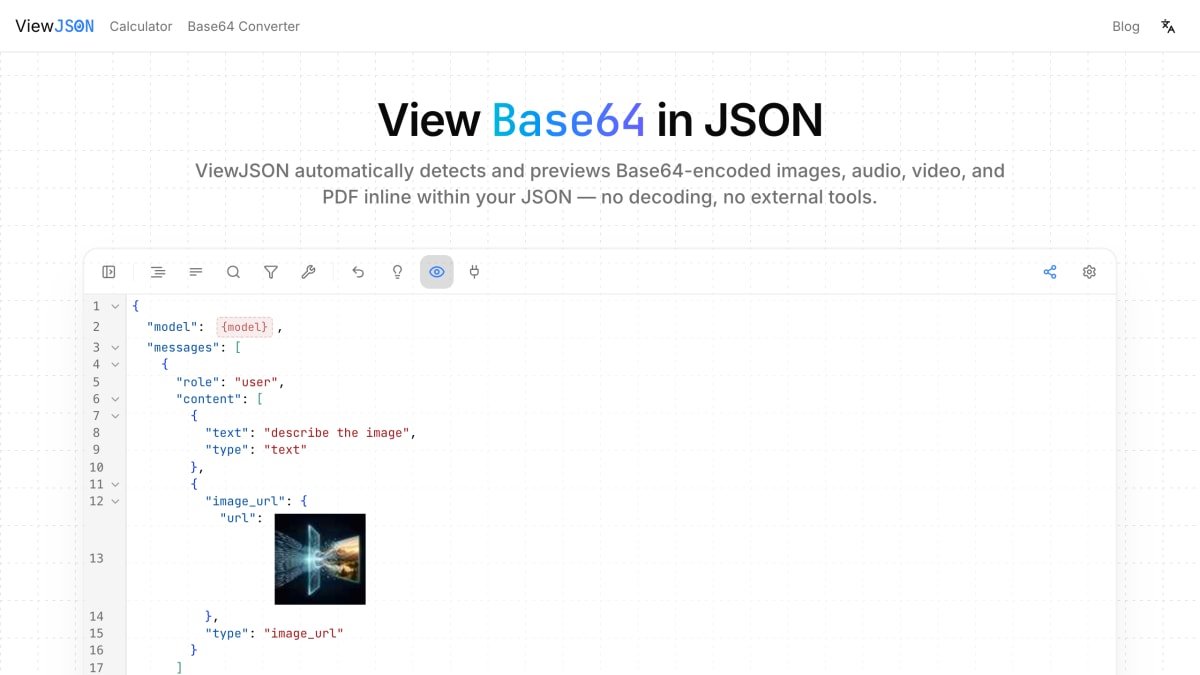
ViewJSON is a browser-based JSON editor that detects and renders Base64-encoded media inline within JSON data, displaying images, audio, video, and PDF content directly instead of showing raw encoded strings. It uses magic number detection to identify over 15 formats, including PNG, JPEG, GIF, WebP, BMP, and ICO images; MP3, WAV, OGG, M4A, and FLAC audio; MP4, WebM, AVI, and MOV video; and PDF documents. The editor is built on CodeMirror 6 and reads only value boundaries for Base64 detection rather than decoding full content upfront, allowing it to remain responsive with large JSON files containing embedded assets.
The tool includes a variable system for inserting named placeholders into JSON values that get substituted on export, copy, or share; an API Request Builder for constructing HTTP requests with custom headers and exporting them as cURL or HTTP format; and automatic browser-history saving of JSON with a sidebar for restoring previous versions. Sharing works through client-side AES-GCM encryption, where JSON content is encrypted in the browser before upload, the server stores only ciphertext, and the decryption key is appended to the share link's URL hash. All Base64 decoding, media rendering, and encryption take place locally in the browser, so plaintext data is not sent to the server during normal use.
The product is intended for developers working with multimodal AI APIs — including OCR, text-to-speech, image generation, and vision models — that return Base64-encoded media inside JSON responses, letting them inspect that media without manually extracting and decoding each field. Core features, including JSON formatting, Base64 media preview, sharing, and history, are available without creating an account.
Key features
- Automatically detects and renders Base64-encoded images, audio, video, and PDF inline within JSON
- Quick asset replacement — paste a new image to auto-convert and swap Base64 values
- Secure sharing via client-side AES-GCM encryption, with decryption key kept only in the URL hash
- API Request Builder for constructing HTTP requests and copying as cURL or HTTP format
- Automatically saves JSON to browser history with version restore
Frequently asked questions
Is ViewJSON free to use?
Yes, core features including JSON formatting, Base64 media preview, sharing, and history are available without creating an account.
Is my JSON data uploaded or stored anywhere?
No, JSON content and variables are never uploaded during normal use since all parsing and rendering happens locally in the browser; shared links are encrypted client-side before upload.
Who is ViewJSON for?
It is primarily used by developers who work with multimodal AI APIs like OCR, text-to-speech, image generation, and vision models, which return Base64-encoded media inside JSON responses.
What media formats does ViewJSON support?
It supports 15+ formats via magic number detection, including PNG, JPEG, GIF, WebP, BMP, ICO images, MP3, WAV, OGG, M4A, FLAC audio, MP4, WebM, AVI, MOV video, and PDF documents.
Can ViewJSON handle large JSON files?
Yes, it uses the CodeMirror 6 editor and reads only value boundaries for Base64 detection instead of decoding full content upfront, keeping large files responsive.


SerpApi - Search API
SerpApi's Search API makes it easy and fast to scrape Google and other search engines.

Show your product to thousands of developers
· 100k monthly pageviews
· 7k newsletter subscribers
You might also like
Vaiz
Productivity/Tooling/DocumentationOne platform for Tasks & Documents.
ValidateHTML
Testing/Tooling/SEOFree online validation tools for HTML, CSS, JSON, XML, meta tags, and Open Graph. Get instant quality scores from 0 to 100.
VibeStack
Tooling/AI/DesignCurated directory of AI, design, and development products and tools.
Voiden API Client
API Building/ToolingOffline, Git Native API Client - Design, Test & Document APIs in one place. Plain text executable files all the way. Community plugins.
Webacus
Productivity/ToolingWebacus is a versatile tool designed specifically for developers. It combines numerous operations that developers frequently need into a single, consistent interface. Instead of Googling and learning the interface for each operation, you can perform everything you need within Webacus, seamlessly.
Work Type Focus
Productivity/Analytics/ToolingClassify and visualize Jira work to stay focused and foster innovation.