
HTML5 Accessibility
Get the current accessibility support status of HTML5 features across major browsers.
About HTML5 Accessibility
HTML5 Accessibility is a testing site that tracks the accessibility support status of newer HTML5 features across major browsers. It reports whether each feature is keyboard accessible, mapped to platform accessibility APIs, and whether related accessibility features are supported, covering elements such as article, section, nav, aside, header, footer, figure, main, time, mark, canvas, audio, video, track, form input types (search, tel, url, email, date, number, range, color, and others), datalist, output, progress, meter, details/summary, and dialog.
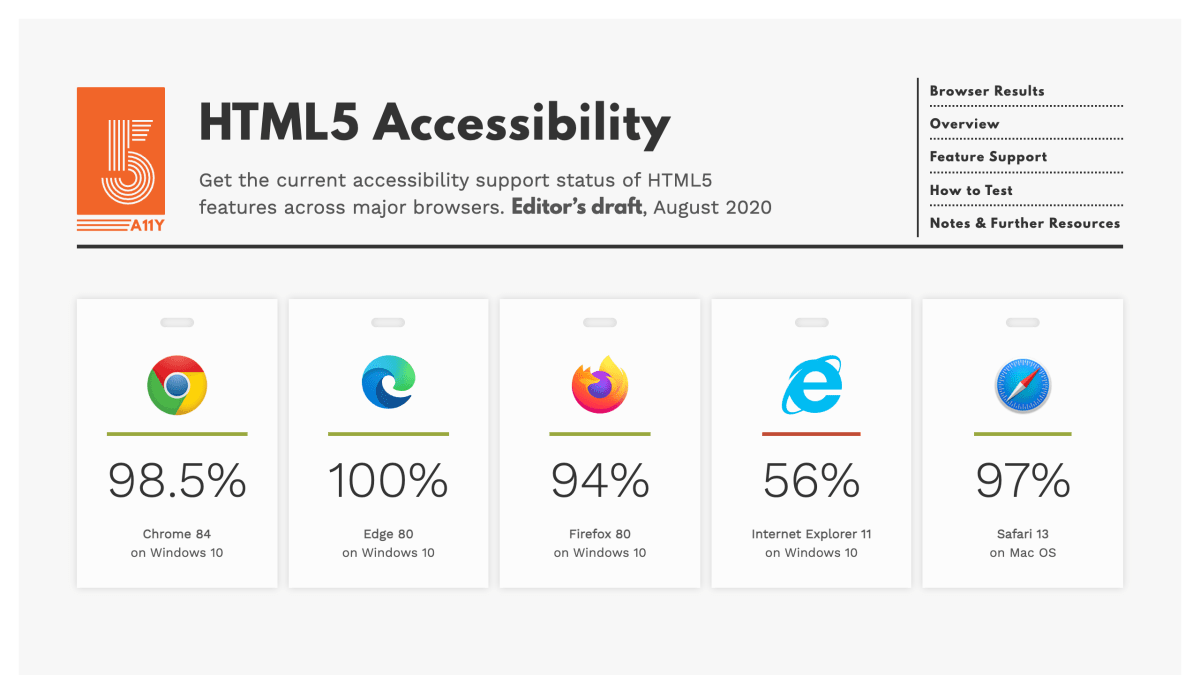
The site presents an overview of accessibility support percentages for specific browser versions (including Chrome, Edge, Firefox, Internet Explorer, and Safari on Windows and Mac OS), along with detailed per-feature tables breaking down implementation status, API mapping, name/description support, keyboard support, and error-state mapping. It also links to a blog and to further resources on how to interpret the test results.
It is intended for web developers and accessibility practitioners who need to know which HTML5 elements and input types can be used without requiring supplemental ARIA or other workarounds to remain accessible in a given browser.
Key features
- Tests accessibility support of HTML5 features across major browsers
- Covers sectioning elements like article, section, nav, aside, header, footer, figure, main
- Covers form input types including date, email, tel, url, number, range, and color
- Reports keyboard accessibility and mapping to platform accessibility APIs
- Tracks support for details/summary, dialog, progress, meter, and output elements
Frequently asked questions
What browsers does this site test?
It tests Chrome, Edge, Firefox, Internet Explorer 11, and Safari.
What does it mean for a feature to be accessibly supported?
It means the feature is keyboard accessible, mapped to platform accessibility APIs, and usable by assistive technology users without developers adding ARIA or other workarounds.
Which browser has the best HTML5 accessibility support according to the tests?
Edge 80 on Windows 10 scored 100%, followed by Chrome 84 at 98.5% and Safari 13 at 97%.
Who is this resource for?
It is for developers who want to check which HTML5 features are accessibly supported before relying on them without extra ARIA workarounds.


SerpApi - Search API
SerpApi's Search API makes it easy and fast to scrape Google and other search engines.

Show your product to thousands of developers
· 100k monthly pageviews
· 7k newsletter subscribers
You might also like
Color Contrast Checker
AccessibilityMake sure your website has accessible colors.
Color.review
Accessibility/ColorA modern tool for exploring and finding accessible colors. Make sure that everyone can see your creations.
Contrast Ratio
Accessibility/ColorEasily calculate color contrast ratios.
Inclusive Components
AccessibilityA blog trying to be a pattern library. All about designing inclusive web interfaces, piece by piece.
PageGuard
SEO/Accessibility/PerformanceFree all-in-one website health scanner. Checks SEO, ADA/WCAG accessibility, Core Web Vitals performance, and best practices in one scan. Paid plans add automated monitoring and alerts.
Stark
AccessibilityThe suite of integrated accessibility tools for your product design and development team • Making the world’s products accessible.