
BulkPicTools
Free browser-based bulk image processor. Compress to exact file sizes, convert HEIC/WebP/AVIF/PNG/JPG, resize, crop, watermark 1,000+ images at once. No upload, no account, works offline.
About BulkPicTools
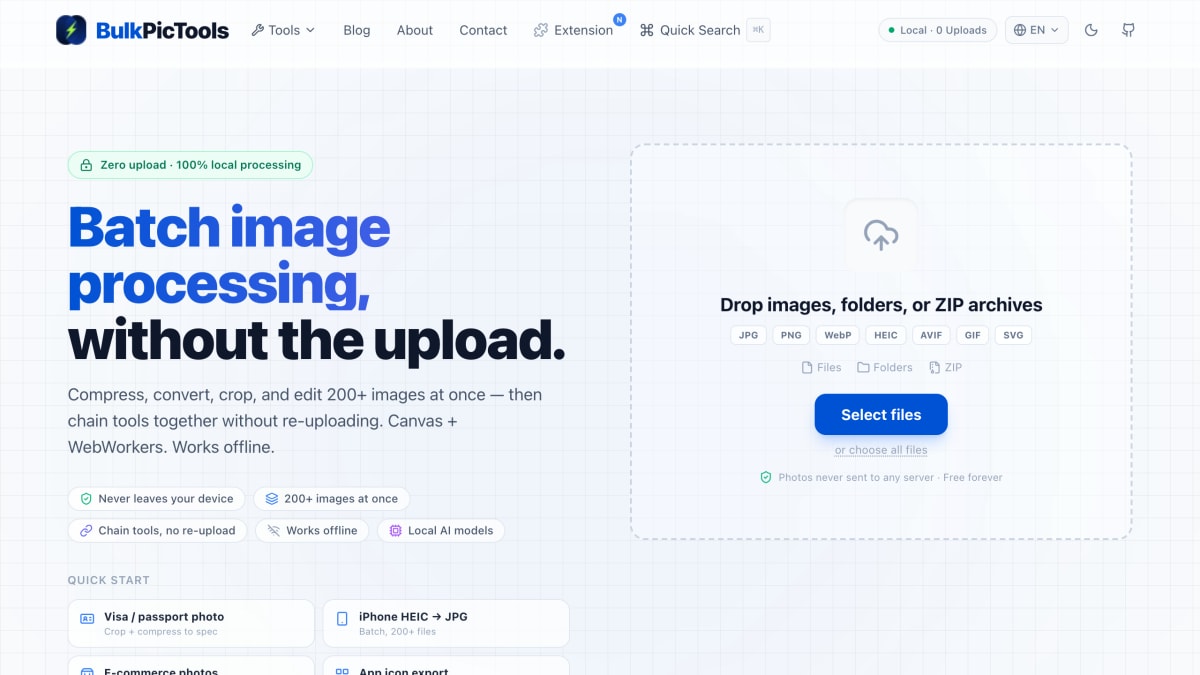
BulkPicTools is a browser-based batch image processing tool that performs all operations locally, without uploading files to a server. It supports compressing, converting, cropping, and editing up to 200+ images at once, accepting individual files, folders, or ZIP archives as input, and works with JPG, PNG, WebP, HEIC, AVIF, GIF, and SVG formats. Processing uses Canvas and WebWorkers in the browser and the tool can operate offline.
The tool chains multiple operations together in a single session so that output from one step (e.g., conversion) feeds directly into the next (e.g., compression or cropping) without requiring the user to download and re-upload files between steps. Listed use cases include converting HEIC iPhone photos to JPG in batch, preparing visa or passport photos to spec, processing e-commerce product photos, and exporting app icons in multiple platform sizes.
BulkPicTools offers 79 individual tools covering categories such as crop, convert, compress, edit, rotate, and GIF processing. It is described as free forever.
Key features
- Batch process 200+ images at once with local, in-browser processing
- Chains multiple tools together without re-uploading between steps
- 100% local processing — photos never sent to any server
- Works offline using Canvas and WebWorkers
- Supports JPG, PNG, WebP, HEIC, AVIF, GIF, and SVG formats
- 79 free tools covering compress, crop, convert, edit, and rotate
Frequently asked questions
Is BulkPicTools free to use?
Yes, it's free forever with no upload required.
Are my photos uploaded to a server?
No, all processing happens locally in the browser and photos never leave the device.
Can I process multiple images at once?
Yes, you can batch process 200+ images at a time by dropping files, folders, or ZIP archives.
Does it work without an internet connection?
Yes, it works offline using Canvas and WebWorkers.
What image formats are supported?
It supports JPG, PNG, WebP, HEIC, AVIF, GIF, and SVG.


SerpApi - Search API
SerpApi's Search API makes it easy and fast to scrape Google and other search engines.

Show your product to thousands of developers
· 100k monthly pageviews
· 7k newsletter subscribers
You might also like
Blurbackground AI
AI/Image/DesignBlurbackground.AI is a free online tool to edit background swiftly.
CapCut
Image/Editor/VideoCapCut is an all-in-one online video editing software which makes creation, upload & share easier, with frame by frame track editor, cloud drive etc.
CleanSnap
Image/Screenshot/AICleanSnap is a free AI Images maker. Create a beautiful image from a screenshot in seconds. Without any watermark.
Compressor
Image/ToolingOptimize and compress your jpeg and png images online. Compressor is a lossy and lossless photo compression tool.
ConvertImage.tools
Image/ToolingFree browser-based image tools including converter, compressor, background remover, and more. All processing happens client-side with no signup required.
Convertyard
ImageConvertYard converts images, PDFs, audio, and video files locally using WebAssembly — your files never leave your device.