BragDoc
CLI tool that extracts achievements from git commits for performance reviews.
About BragDoc
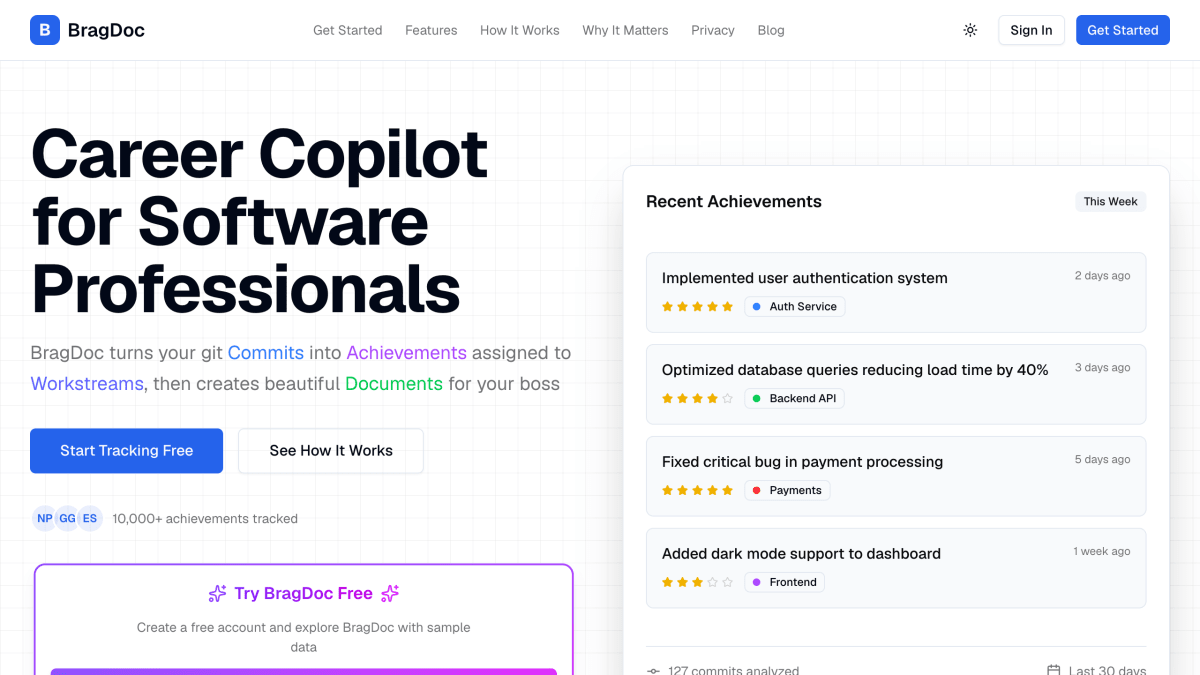
BragDoc is a command-line and web-based tool that extracts professional achievements from git commit history using AI. Developers run a CLI tool (installed via npm as @bragdoc/cli) inside their repositories to analyze commits and identify meaningful accomplishments, which are then organized into categories called workstreams. Commit analysis runs locally on the developer's machine rather than being sent to BragDoc's servers, and users can choose what data to sync to the cloud, with synced data stored using end-to-end encryption.
The web dashboard lets users tag and categorize achievements, view impact ratings and timeline visualization, and generate reports and documents such as weekly reports, monthly reports, and performance review summaries, with export to PDF or Markdown and one-click report generation. These outputs are intended to help developers document their work for managers and performance reviews rather than relying on memory at review time.
BragDoc is aimed at software developers and other technical professionals who want to track their work output over time for use in performance reviews and career documentation. A free account is available to explore the product with sample data, and AI-powered document generation is noted as a beta feature.
Key features
- CLI tool analyzes git commits locally with AI to extract achievements
- Auto-categorizes achievements into workstreams by project and impact
- Generates one-click reports and performance review documents (export to PDF/Markdown)
- Impact rating (1-5 stars) and timeline visualization of achievements
- Runs entirely locally so code never leaves your machine, with encrypted cloud sync for what you choose to share
Frequently asked questions
Is BragDoc free to use?
Yes, BragDoc is free to start and you can create a free account to sync achievements and unlock AI features.
Is my code safe when using BragDoc?
Yes, the CLI runs entirely on your local machine and analyzes commits without sending your code to BragDoc's servers.
What platforms or tools does BragDoc integrate with?
BragDoc works with any git repository via its CLI, installed globally with npm install -g @bragdoc/cli.
Who is BragDoc for?
It's for software professionals who want to automatically track their achievements from git commits for performance reviews and career documentation.
Can I use BragDoc without the CLI?
This is addressed in BragDoc's FAQ section, though the specific answer is not detailed on this page.


SerpApi - Search API
SerpApi's Search API makes it easy and fast to scrape Google and other search engines.

Show your product to thousands of developers
· 100k monthly pageviews
· 7k newsletter subscribers
You might also like
Best AI Agents Directory
Productivity/AI/StartupCurated Collection of the Best AI Agents to Boost Your Workflow.
BoilerplateHub
Productivity/Template/StartupSave weeks of setup time with production-ready boilerplates, templates and starter kits for SaaS, web and mobile applications. Carefully vetted and maintained by developers.
BoilerplateHunt
Productivity/Template/StartupFind the best boilerplates to ship faster. Explore production-ready boilerplates for SaaS, web, and mobile applications.
Briks
AI/ProductivityThe AI Spreadsheet to Create Reports, Presentations, Charts, and Visuals.
Buildstash
Tooling/Storage/ProductivityBinary artifact and release management for app, game, and embedded software.
BulkPicTools
Image/ProductivityFree browser-based bulk image processor. Compress to exact file sizes, convert HEIC/WebP/AVIF/PNG/JPG, resize, crop, watermark 1,000+ images at once. No upload, no account, works offline.