Realtime Colors
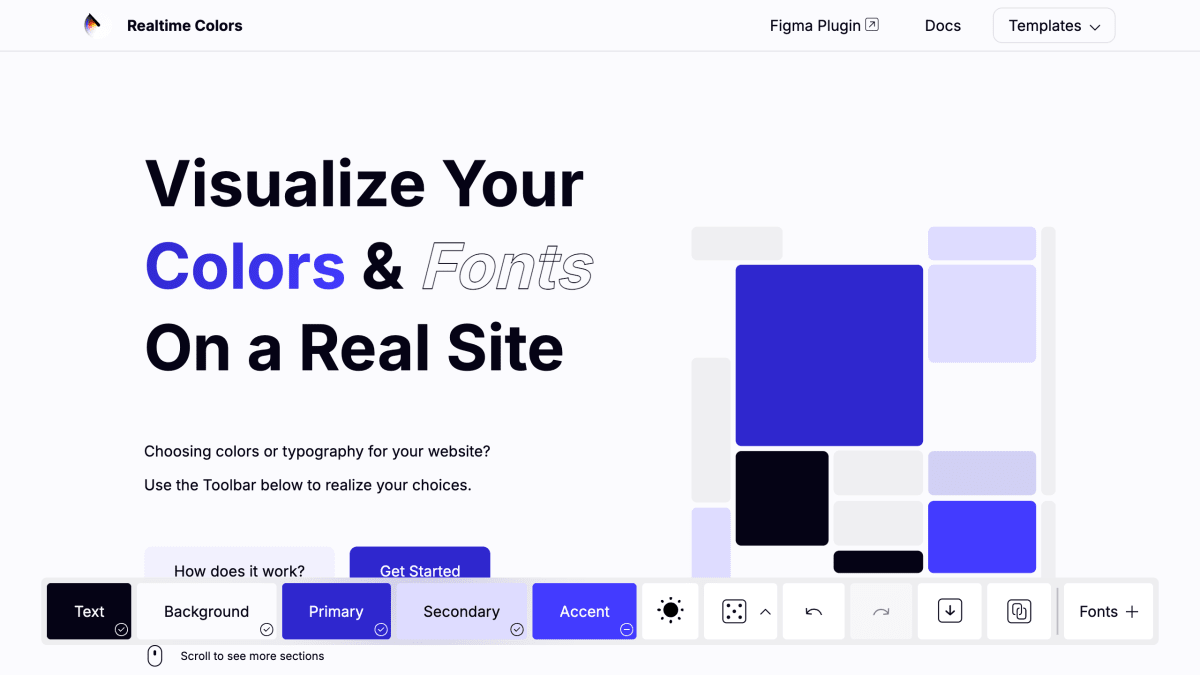
Visualize your colors and fonts on a real website.
About Realtime Colors
Realtime Colors is a tool for previewing color palettes and font choices on a mock website interface rather than in isolation. Users select text, background, primary, secondary, and accent colors, and the tool renders them across a sample page layout so the combination can be evaluated in a realistic context before committing to it. It also includes a contrast checker that rates color/background pairings against AA and AAA accessibility standards.
Beyond color selection, the tool supports font setup: users can specify heading and body fonts from Google Fonts or fonts installed locally, and choose a type scale for sizing. Color schemes can be generated by rule (monochromatic, analogous, complementary, split complementary, triadic, tetradic) or randomized, and results can be exported in formats including CSS, SCSS, Tailwind config, PNG, QR code, and preset formats for frameworks such as DaisyUI, shadcn, NextUI, Flutter, Bootstrap, Material UI, Chakra UI, Skeleton UI, and Vuetify.
The product is aimed at designers and developers choosing branding colors and typography for websites. It is free to use, with generated colors and fonts usable commercially, though the source code and site-specific materials are licensed CC BY-NC-ND. It is also available as a Figma plugin and a VS Code theme editor.
Key features
- Live preview of color palettes applied to a real website mockup
- Choose text, background, primary, secondary, and accent colors
- Built-in contrast checker for AA/AAA accessibility ratios
- Custom font setup using Google Fonts or locally installed fonts
- Export palettes as CSS, SCSS, Tailwind config, PNG, QR code, and more
- Available as a Figma plugin and VS Code theme editor
Frequently asked questions
Is Realtime Colors free?
Yes, the tool is 100% free to use, including choosing any color and exporting.
Can I use the generated colors for commercial projects?
Yes, generated colors and fonts can be used commercially or non-commercially.
What export formats are supported?
You can export as CSS, SCSS, Tailwind config, .zip, .png, QR code, and other formats.
How do I set up custom fonts?
You can enter the name of a font from Google Fonts or a font installed on your device.
Does it integrate with design tools?
Yes, it's available as a Figma plugin with 19K+ users and as a VS Code theme editor.


SerpApi - Search API
SerpApi's Search API makes it easy and fast to scrape Google and other search engines.

Show your product to thousands of developers
· 100k monthly pageviews
· 7k newsletter subscribers
You might also like
Gradientos
ColorFind and test gradients easily.
Happy Hues
ColorSee color palette inspiration on a real example website. As you click on different palettes every color on this site updates to give you context of how that color could be used for your design or illustration projects.
Material Design Palette
ColorChoose your favorite colors and get your Material Design palette generated and downloadable.
Nord
ColorA arctic, north-bluish color palette.
Random Color
ColorSimple tool to generate a random color.
uiGradient
ColorLibrary of dozens of Gradients ready to use with CSS class and also HEX color.