
CSS Scan
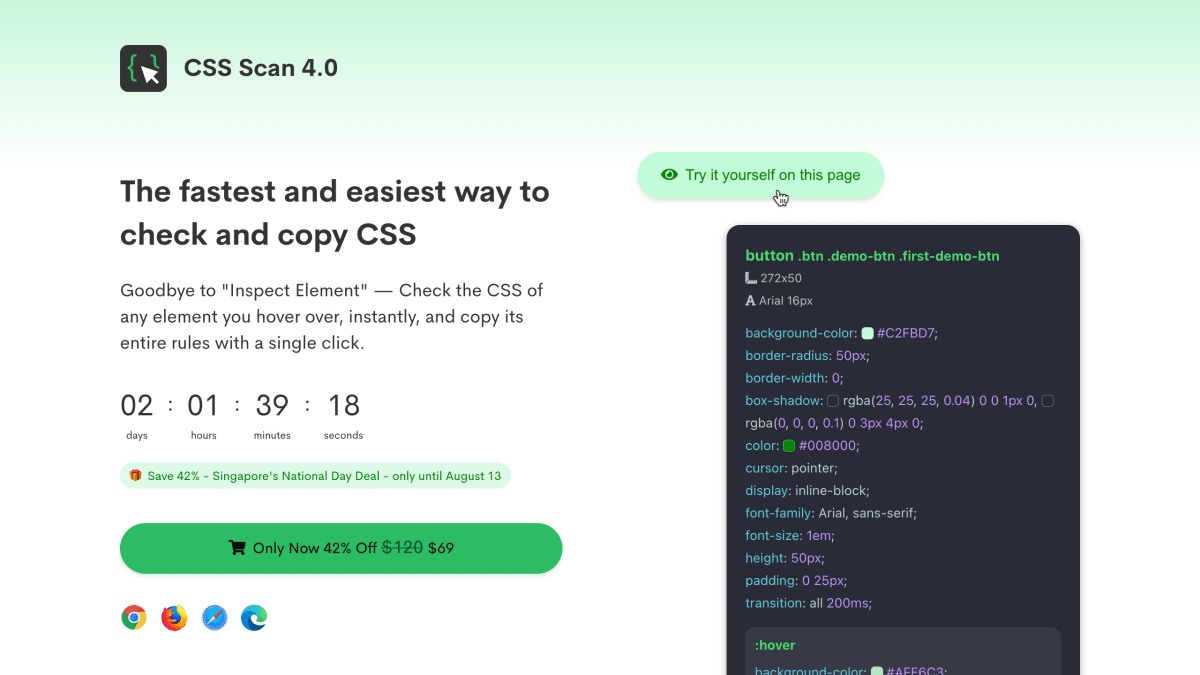
Goodbye to "Inspect Element" — Visualize the CSS of any element you hover over, instantly, and copy its entire rules with a single click.
About CSS Scan
CSS Scan is a browser extension for inspecting and copying CSS from any element on a webpage. Hovering over an element displays its active CSS rules directly, without opening browser developer tools, and a single click copies the code. The extension filters out unused, duplicated, overridden, and longhand CSS, and it preserves original measurement units (such as % and em) rather than converting them to pixels. It also captures pseudo-classes, pseudo-elements, media queries, and child elements in a single copy action, and includes a DOM navigation feature using arrow keys to select parent, sibling, or child elements.
Additional features include an option to convert copied CSS into Tailwind CSS utility classes (including @apply for custom styles), an editable CSS preview that updates in real time, and the ability to export an element's HTML and CSS to CodePen as a saved snippet. The tool works on any website regardless of the underlying framework, theme, or platform, including WordPress, Wix, Squarespace, Shopify, and React sites, and it functions offline once installed.
CSS Scan is aimed at web developers and designers who need to inspect and reuse CSS styling from existing websites. It is available as a browser extension for Chrome, Firefox, Safari, and Edge, sold as a one-time lifetime license priced at $120 (listed at a discounted $69 at time of writing), with each license usable on up to 3 browsers simultaneously. A free demo is available for use on the product's own website on desktop.
Key features
- Hover over any element to instantly view its optimized, deduplicated CSS
- Copy full CSS rules including child elements, pseudo-classes, and media queries with one click
- Edit CSS in real-time by pinning the inspection window with the space bar
- Export elements as HTML/CSS to Codepen snippets
- Convert copied CSS to Tailwind CSS utility classes
- Works as a browser extension on any website offline, regardless of framework or theme
Frequently asked questions
Is there a free tier?
There is a free demo, but it only works on the CSS Scan website itself and on desktop.
What is the pricing model?
It's a one-time lifetime license priced at $69 (discounted from $120), limited to 3 browsers simultaneously.
What browsers does it support?
CSS Scan is available as an extension for Chrome, Firefox, Safari, and Edge.
Does it work on any website or framework?
Yes, it works on any website regardless of framework, plugin, library, or theme, including WordPress, Wix, Squarespace, Shopify, and React.
Does it capture hover states and media queries?
Yes, it copies all CSS pseudo-classes and pseudo-elements like :hover and :focus, as well as all media queries in a single click.


SerpApi - Search API
SerpApi's Search API makes it easy and fast to scrape Google and other search engines.

Show your product to thousands of developers
· 100k monthly pageviews
· 7k newsletter subscribers
You might also like
Chrome Canary
BrowserGet on the bleeding edge of the web with Chrome Canary designed for experienced developers and updated nightly.
Chrome Dev
BrowserGoogle Chrome for developers was built for the open web. Test cutting-edge web platform APIs and developer tools that are updated weekly.
Chrome Reader Mode
Extension/Productivity/BrowserTransform page to simple reading mode.
CSSViewer
Browser/ExtensionA simple CSS property viewer.
Edge
BrowserSee what's new on the latest version of the Microsoft Edge browser. Explore features, rewards, and more before you download the new browser today.
Edge Canary
BrowserWant to see what we were working on yesterday? Canary will be released automatically almost every night to keep you up to date on our progress.