
toast.log
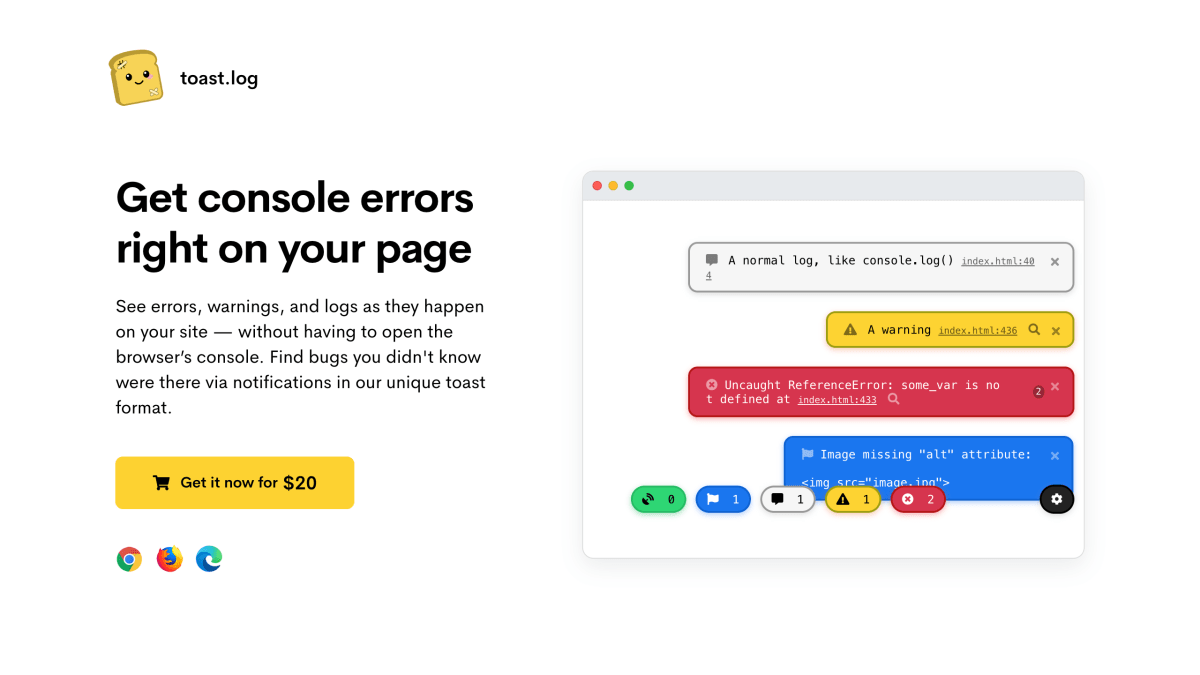
See errors, warnings, and logs as they happen on your site — without having to open the browser’s console. Find bugs you didn.
About toast.log
toast.log is a browser extension that surfaces JavaScript console output, errors, warnings, and network requests directly on the webpage being viewed, rather than requiring the browser's developer tools to be open. It listens to functions such as console.log(), console.error(), and window errors, and displays them as toast notifications in real time. It also reports SEO-related issues, such as images missing "alt" attributes or pages missing meta description tags, and shows network request details including URL, method, and response.
The extension requires no code or script changes to the site being debugged; it works on any website or theme, including offline, and can be toggled on or off globally or per domain. Notifications are visible only to the person running the extension, not to other site visitors. Additional features include filtering logs by type (errors, warnings, logs), searching through logs by text, expandable viewing of arrays/objects/JSON, one-click Google search for error diagnosis, and customizable toast appearance (font size, opacity, border radius).
toast.log is aimed at developers who want to debug websites—their own or others'—without repeatedly opening and closing browser devtools, including while browsing a site as a normal user would. It is built for Chrome, Firefox, and Edge (and likely other Chromium-based browsers), with Safari support planned. Licensing is per-seat, allowing up to 3 simultaneous activations per license, which can be deactivated and reactivated by the user. Pricing is $20 for one license, $40 for two, and $60 for five, sold through Gumroad.
Key features
- Shows console logs, warnings, and errors as on-page toast notifications without opening DevTools
- Displays file name and line number for errors, with one-click Google search to diagnose them
- Shows all network requests with URL, method, and response in real-time
- Flags SEO issues like missing image alt attributes and missing meta description tags
- Filters and searches logs by text, and supports expandable arrays, objects, and JSON
- Toggle on/off per domain, works offline, and requires no code or script changes
Frequently asked questions
How much does toast.log cost?
A single license costs $20, 2 licenses cost $40, and 5 licenses cost $60, purchased via Gumroad.
Which browsers are supported?
toast.log is developed and tested on Chrome, Firefox, and Edge, and may work on other Chromium-based browsers. Safari support is coming soon and Internet Explorer is not planned.
Do I need to modify my code to use it?
No, you keep using console.log and other console methods as before without adding any script or changing your code.
Can my website visitors see the error notifications?
No, the toast notifications are only visible to you when you activate the extension, not to other visitors.
How does the license activation work?
Each license allows up to 3 simultaneous activations, which can be deactivated and reactivated anytime from toastlog.com/my-license.


SerpApi - Search API
SerpApi's Search API makes it easy and fast to scrape Google and other search engines.

Show your product to thousands of developers
· 100k monthly pageviews
· 7k newsletter subscribers
You might also like
Safari Technology Preview
BrowserSafari is the best way to see the sites on iPhone, iPad, and Mac. Safari Technology Preview gives you an early look at upcoming web technologies in macOS and iOS.
Sizzy
Browser/Programming/TestingStop wasting time and speed up your development workflow.
Test API
Browser/ExtensionUse Test API for RESTful API testing. This Postman alternative tests REST APIs online with support for all HTTP methods, custom headers, and real-time response visualization.
Url Opener
Extension/Productivity/BrowserOpen multiple urls with one click.
Vue.js devtools
Browser/ExtensionBrowser devtools extension for debugging Vue.js applications.
Wappalyzer
Browser/ExtensionFind out the technology stack of any website. Create lists of websites and contacts by the technologies they use.