Text Differ
Whether you're revising an article, checking document updates, or reviewing code, Text Differ helps you spot every change quickly and confidently.
About Text Differ
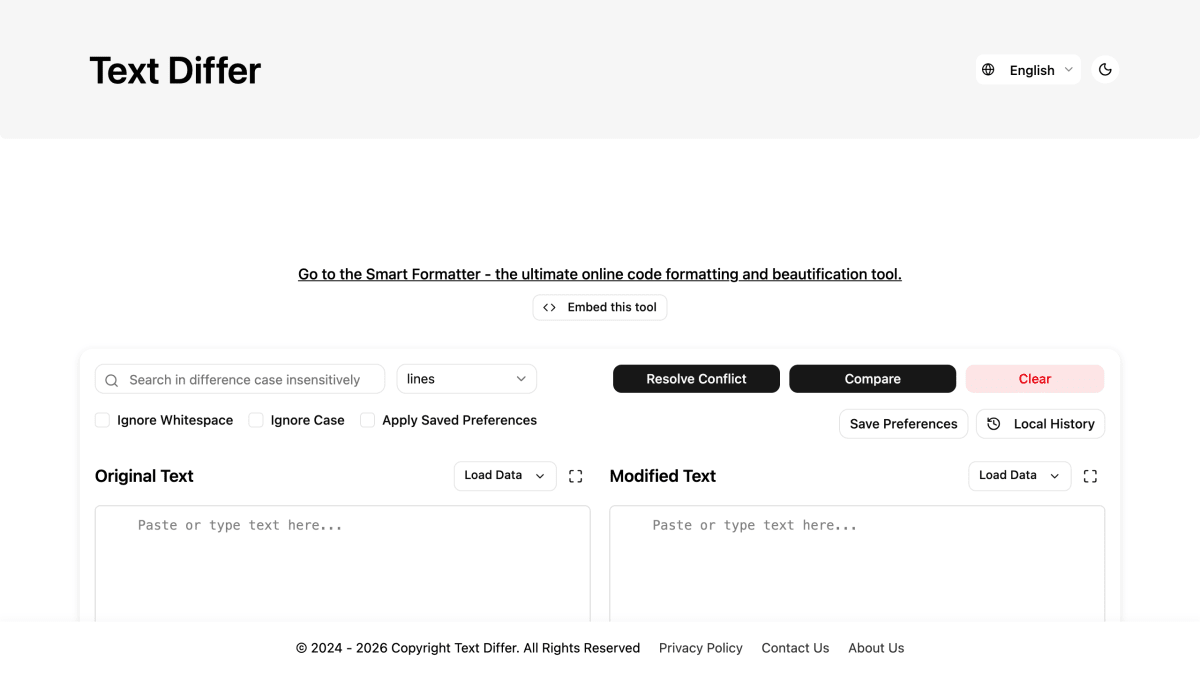
Text Differ is a browser-based tool for comparing two pieces of text and viewing the differences between them. Users paste content into side-by-side input boxes, or load it from a file or URL, and the tool highlights additions, deletions, and revisions. It offers multiple comparison modes — paragraph, word-by-word, and character-by-character — along with options to ignore case and whitespace, a one-click revert function, and a 3-way merge feature for combining three versions of a document into one. It supports plain text as well as source code and formats such as JSON, HTML, CSS, JavaScript, and Python.
The tool stores a history of the 10 most recent comparison sessions for later access and allows users to save preference presets for filter settings. It requires no account creation, download, or installation, and is described as free to use.
It is intended for writers and editors comparing document drafts, developers tracking code changes between versions, students checking for accidental revisions or plagiarism in essays, and content reviewers tracking changes in contracts and scripts.
Key features
- Side-by-side text diff with highlighted additions, deletions, and edits
- Multiple comparison modes: paragraph, word-by-word, and character-by-character
- 3-way merge to combine three versions of a file into one
- Ignore case and ignore whitespace comparison settings
- Load text from a URL or uploaded file
- Stores your 10 most recent comparison sessions for later access
Frequently asked questions
Is Text Differ free to use?
Yes, Text Differ is completely free and requires no sign-up or installation.
What formats does Text Differ support?
It supports plain text and code formats including JSON, HTML, CSS, JavaScript, and Python.
Who is Text Differ for?
It's built for writers and editors, developers, students, and content reviewers who need to compare document or code versions.
Can I compare more than two versions of a document?
Yes, Text Differ includes a 3-way merger that lets you open three versions of a file and produce one combined result.
Does Text Differ ignore case and whitespace differences?
Yes, it offers flexible comparison settings to ignore letter case and unnecessary whitespace.


SerpApi - Search API
SerpApi's Search API makes it easy and fast to scrape Google and other search engines.

Show your product to thousands of developers
· 100k monthly pageviews
· 7k newsletter subscribers
You might also like
Softwium
ToolingRandom data generator supports CSV, JSON, SQL, and XML formats.
Sqlable
Tooling/DatabaseOnline database tools: SQL formatter and validator, SQL regex tester, fake data generator, and database playgrounds.
TestSprite
Testing/AI/ToolingThe most powerful AI testing tool for testing, fixing, and validating your software in one automated flow.
ToolKit
ToolingToolKit is a collection of free online utilities built for developers, designers, and everyday users. Every tool runs entirely in the browser using Web APIs — nothing is sent to a server.
TrackingCoder
Analytics/Marketing/ToolingSet up website tracking in 2 minutes, not 2 hours.
Treblle
API Building/Tooling/AnalyticsTreblle is the ultimate end to end APIOps Platform for Engineering and DevOps teams. Simplify and elevate your REST API development with our comprehensive solution that offers insightful observability of APIs in a single, user-friendly interface.