





🎁 Black Friday: 40% off the first payment of every plan, and Skip the queue for $29, through December 6.
PixVibe is in the queue
It will be published on January 13, 2027.
From $29 instead of $49, live within minutes
Added from GitHub
Added from the open-source list.
In the queue
Until January 13, 2027.
Live
Listed on Dev Resources, with a link to its website.

PixVibe
Image, Performance, AI
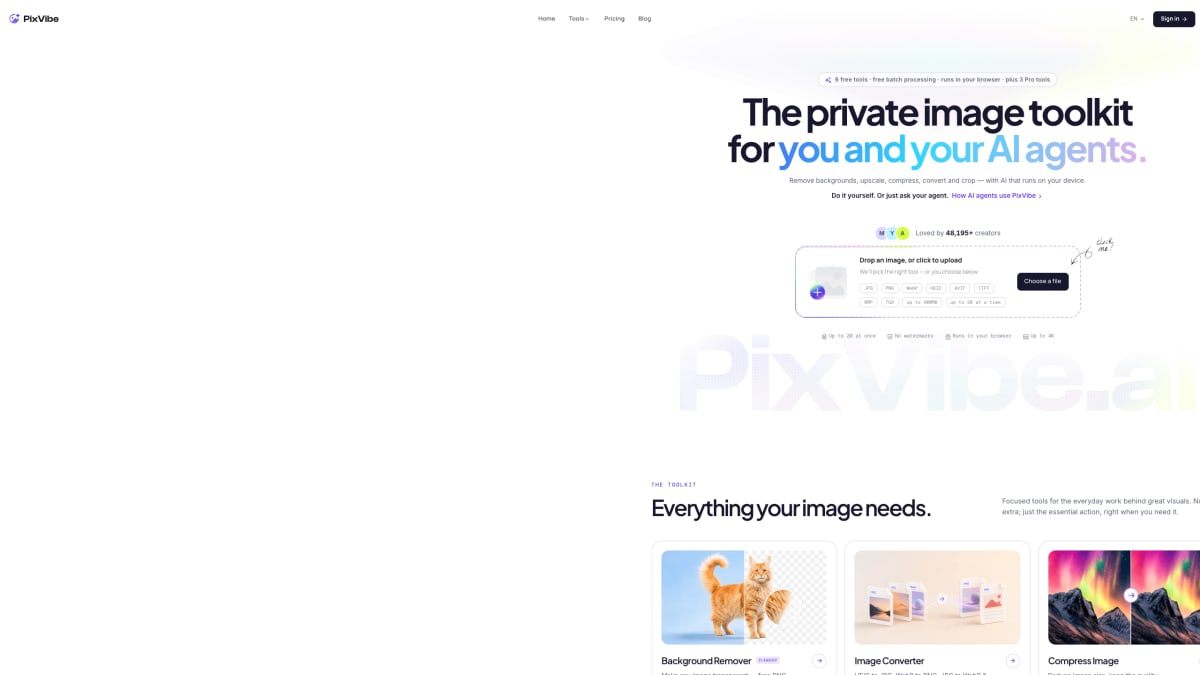
Image toolkit for developers and AI agents: compress, convert (HEIC, WebP, AVIF), resize, crop, upscale and remove backgrounds. Free tools run in the browser.
About PixVibe
PixVibe is a browser-based image editing toolkit offering background removal, format conversion (including HEIC, WebP, AVIF, TIFF, BMP, TGA, JPG, PNG), compression, resizing, cropping, and AI-based upscaling up to 4x. The free tools process images locally in the browser without uploading files to a server, support batches of up to 20 images with a ZIP download, and handle files up to 400MB depending on the tool.
The service also offers Pro tools that run on PixVibe's servers using AI models: a high-precision AI background remover for hair and fine detail, an HD image converter that upscales and converts to WebP, PNG, or JPG, and an AI image enhancer using multiple models. These Pro tools consume credits and delete uploaded images within 24 hours. An account is not required for the free browser-based tools, but signing in (free) is needed to unlock batch processing, touch-up features, the Pro AI tools, and free daily credits. A conversational AI image editor is listed as coming soon.
Key features
- Removes image backgrounds for free, producing transparent PNGs
- Converts between formats like HEIC, WebP, JPG, PNG, AVIF, TIFF, BMP and TGA
- Compresses, resizes and crops images while preserving quality
- AI upscaler increases image resolution up to 4x
- Batch processes up to 20 images at once with a ZIP download
- Free tools run entirely in the browser so files are never uploaded
Frequently asked questions
Is PixVibe free to use?
The 6 core tools (background remover, converter, compressor, resizer, cropper, upscaler) are free with no signup required. 3 Pro tools (AI Background Remover HD, HD Image Converter, AI Image Enhancer) run on PixVibe's servers and use credits, starting from 10-20 credits per use.
What file formats and sizes does it support?
It supports JPG, PNG, WebP, HEIC, AVIF, TIFF, BMP, and TGA images up to 100MB, or up to 400MB in the image compressor.
Do I need an account to use it?
No account is needed for the free tools, but signing in (free) unlocks batch processing of up to 20 images, touch-up, the advanced AI tools, and free daily credits.
Is my data private when using PixVibe?
The free tools run entirely in your browser so files are never uploaded, while the Pro AI tools upload only the chosen image to PixVibe's servers, where it is deleted within 24 hours.
Can I process multiple images at once?
Yes, background removal, conversion, compression, resizing, cropping and AI upscaling all support batches of up to 20 images with a ZIP download at the end.

Thordata
Reliable residential proxies for web scraping and automation: over 100 million real residential IPs across 190+ countries, plus a SERP API, Web Scraper API and Web Unlocker.

SerpApi - Search API
SerpApi's Search API makes it easy and fast to scrape Google and other search engines.
Show your product to thousands of developers
· 100k monthly pageviews
· 9k newsletter subscribers