
Open Ports
Manage open ports from your macOS menu bar. Never google "How to kill a process by port?" again.
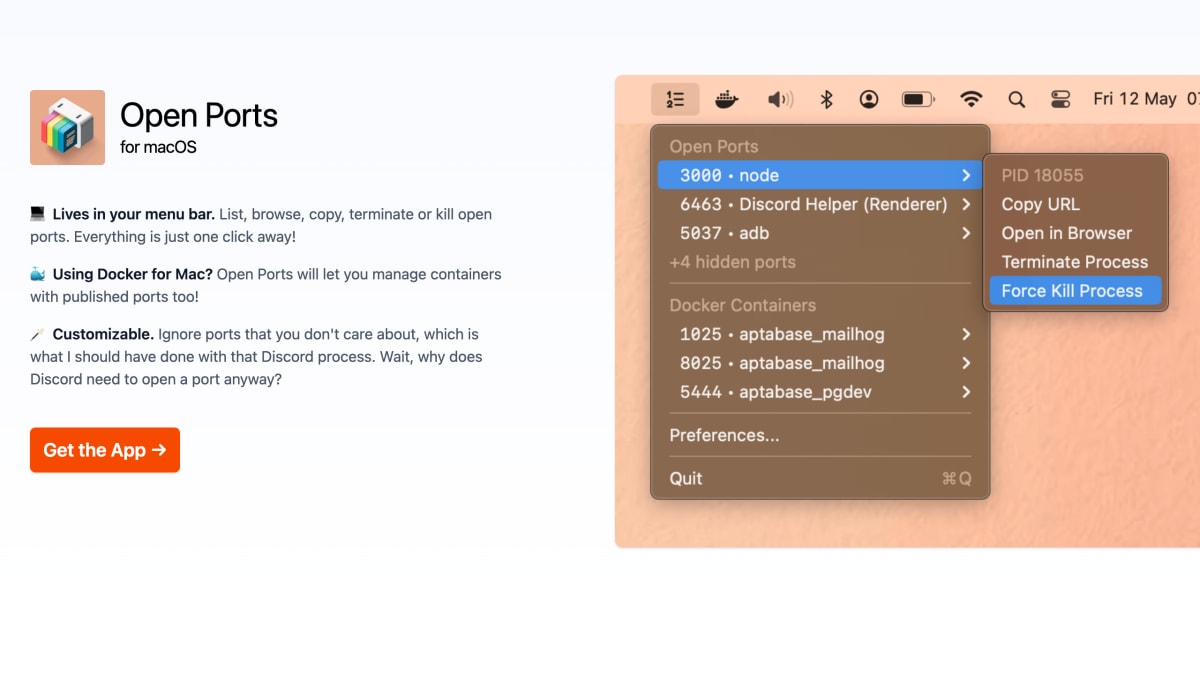
About Open Ports
Open Ports is a macOS menu bar application for listing, browsing, copying, terminating, and force-killing processes that have open network ports. It functions as a graphical front end for the `lsof` and `kill` commands, showing the process name, process ID, and port number for each listening connection.
The application also supports Docker for Mac, allowing management of containers with published ports. It includes a customization option to ignore specific ports the user does not want to monitor.
This tool is aimed at macOS users, including developers, who want a visual way to inspect and manage open ports and terminate processes without using the terminal directly.
Key features
- Lists all open network ports from the macOS menu bar
- Browse, copy, terminate, or kill processes bound to ports with one click
- Manages Docker for Mac containers with published ports
- Customizable ignore list to hide ports you don't care about
- Acts as a GUI alternative to the lsof and kill terminal commands
Frequently asked questions
What platform does Open Ports run on?
Open Ports is a macOS menu bar app.
Does it support Docker?
Yes, it can manage Docker for Mac containers that have published ports.
Can I customize which ports are shown?
Yes, you can ignore specific ports you don't care about.
What can I do with a listed port?
You can list, browse, copy, terminate, or kill the process using that port with one click.
Is there a terminal-based alternative to using the app?
Yes, the same functionality can be done manually using the lsof command to list ports and kill to terminate processes.


SerpApi - Search API
SerpApi's Search API makes it easy and fast to scrape Google and other search engines.

Show your product to thousands of developers
· 100k monthly pageviews
· 7k newsletter subscribers
You might also like
NativeBridge
Productivity/Testing/ToolingShow, Share, Approve: Mobile Apps in Any Browser.
NexTool
Tooling/Programming228+ free browser-based developer tools including JSON formatter, Base64 encoder, regex tester, color converter, UUID generator, and more. No signup required.
Omnara
AI/Programming/ToolingCommand Center for AI Coding Agents.
Open Source Alternatives
Open Source/Productivity/ToolingHandpicked Open Source Alternatives to Paid Softwares.
OpenTools
Tooling/NewsletterDiscover and compare over 10,000 AI tools, curated and ranked by our community of over 50,000 users.
Payload Components
CMS/Programming/ToolingAn MIT registry and CLI that installs typed Payload CMS blocks into Payload v3 and Next.js projects with automated collection, renderer, type, and admin import-map wiring.